Originally published on LinkedIn
Handling intermittent failures in integrations is a common challenge, especially when dealing with external systems that may experience temporary unavailability. To address this, the SAP Integration Suite now includes the Retry Failed Requests feature for the HTTP receiver adapter, allowing automatic retries of failed requests instead of manual intervention.
If you've ever faced connection errors, timeouts, or service disruptions, this enhancement can help ensure more reliable message processing without additional development effort.
How Does It Work?
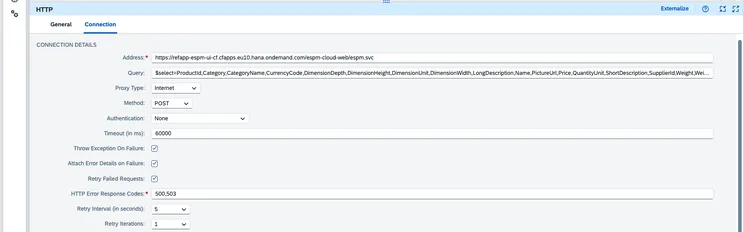
The Retry Failed Requests option enables SAP Cloud Integration to retry an HTTP request when a failure occurs automatically. However, this feature is only available when "Throw Exception on Failure" is enabled in the HTTP receiver adapter configuration. Once enabled, you can configure several retry parameters:
HTTP Error Response Codes
Define which HTTP error codes should trigger a retry (e.g., 500 - Internal Server Error, 503 - Service Unavailable). This helps prevent unnecessary retries for errors that require manual intervention (e.g., 400 - Bad Request).
Retry Interval (in seconds)
Set the time delay between retry attempts. The system will wait for the configured duration before sending the next request. The maximum allowed interval is 60 seconds.
Retry Iterations
Specify how many times the request should be retried before marking it as a failure. If configured, the system allows up to three retry attempts before handing control over to an Exception Subprocess.
Handling "Retry-After" Headers
Some backend systems return a Retry-After header when they experience high load or temporary downtime. This header tells the client how long to wait before sending another request. When present, SAP Cloud Integration prioritizes this value over the configured retry interval.
- If the Retry-After header specifies a delay in seconds, SAP Cloud Integration will respect it.
- If the Retry-After header provides a specific date/time, it will not be considered.
This ensures better alignment with backend server limitations and prevents unnecessary overload.
Important Considerations
- Non-Persistent Retries – Retries occur in memory. If the system restarts, all retry attempts reset, and the request will not be retried.
- Exception Subprocess Handling – If you already have an Exception Subprocess, it will only trigger after all retry attempts fail. If needed, update your subprocess logic to account for the new retry behavior.
- Cloud Foundry Availability – While this feature was initially available only in SAP CPI (Neo), it is now also available in Cloud Foundry environments (version 7.18.xx and above).
Why This Matters
This feature is a game-changer for handling transient failures in HTTP-based integrations. Instead of relying on external workarounds or manual interventions, retries now happen seamlessly within SAP Cloud Integration.
By leveraging this functionality, organizations can:
- Improve integration reliability by handling temporary issues automatically.
- Reduce manual effort by minimizing the need to resubmit failed messages.
- Ensure better alignment with backend systems using Retry-After headers.