Publicado originalmente en SAP Community
A few months ago, I shared how to expose SAP Integration Suite iFlows as MCP tools so that AI agents could discover and invoke OData operations.
That PoC worked. But it left one important question unanswered:
When an AI agent calls an enterprise API, whose identity is it actually using?
My previous setup used OAuth 2.0 client_credentials: a good fit for machine-to-machine scenarios, but a technical identity is not the human talking to the agent. If every user's requests are executed under the same technical account, backend permissions and audit trails cannot automatically reflect the individual behind each request.
So I built a second PoC: SAP MCP Principal Propagation Inspector. The goal was to send a real end-user identity from an MCP client through SAP Integration Suite and SAP Cloud Connector to a non-SAP Node.js backend, and have that backend independently validate the identity and enforce its own authorizations.
The result: real end-to-end Principal Propagation, with the backend reporting VERIFIED. More importantly, it refused to return data the authenticated user was not authorized to access.
get_my_orders  |  HTTP 200  |  Principal Propagation: VERIFIED
mTLS system identity: verified
Propagated user certificate: verified
Backend role: SALES
Authorization: 0 of 4 orders visible
Four orders existed. The agent received zero. Not because the language model chose to hide them, but because the backend prevented the data from entering the agent's context.
1. Architecture: MCP, OAuth and X.509 Principal Propagation
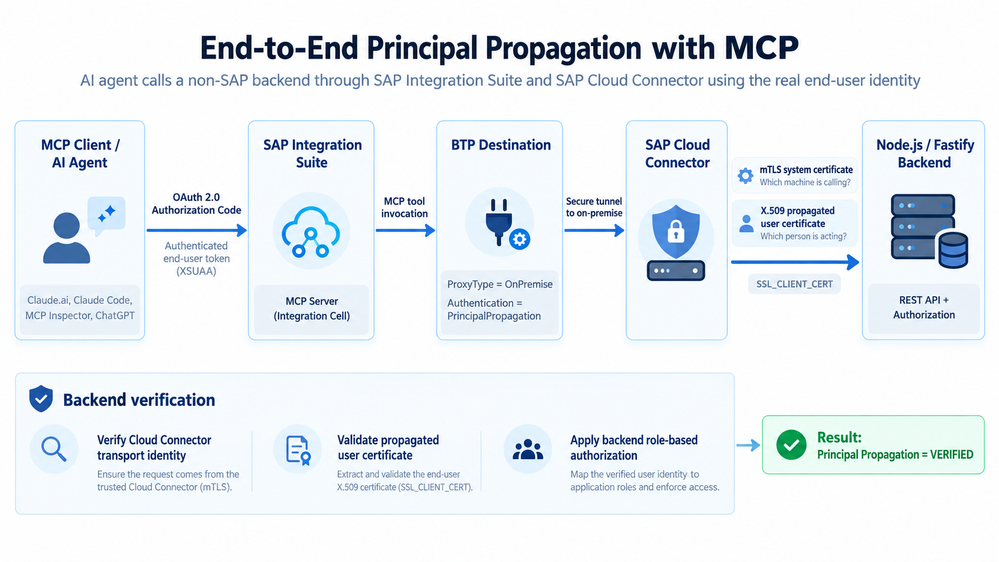
The complete path looks like this:
MCP Client (Claude / MCP Inspector)
    |  OAuth 2.0 authorization_code, human user
    v
SAP Integration Suite - MCP Server (Integration Cell)
    |  BTP Destination: OnPremise + PrincipalPropagation
    v
SAP Cloud Connector
    |  1. mTLS with SCC SYSTEM certificate
    |  2. Short-lived X.509 END-USER certificate
    |     forwarded as SSL_CLIENT_CERT
    v
Node.js 22 / TypeScript / Fastify backend
    |  Verify system TLS peer BEFORE parsing user header
    |  Validate user certificate and map to principal
    |  Apply local application permissions
    v
Business API response: only authorized data
The key distinction is that two different identities must be verified:
Check Question Evidence Enforcement
| System | Which machine is connecting? | SCC system certificate presented on the TLS socket | mTLS verification and peer identity pinning |
|---|---|---|---|
| End user | On whose behalf is it acting? | Propagated short-lived X.509 certificate | Certificate validation and backend RBAC |
A certificate placed in an HTTP header is not automatically trustworthy. The backend first authenticates the transport peer. Only then does it inspect the user certificate, which is delivered through the trusted Cloud Connector path.
2. Build a non-SAP backend with authorization that the agent cannot bypass
I implemented a small REST application in Node.js 22, TypeScript and Fastify, deployed with Docker in a Proxmox homelab. SQLite stores the fictional business data; a React/Vite dashboard provides observability.
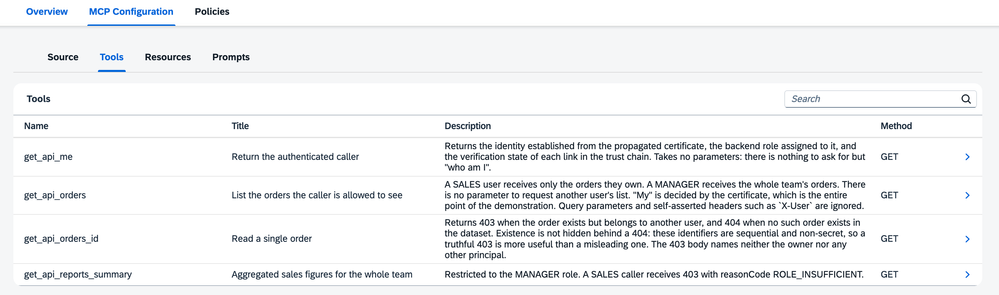
The MCP tool surface is intentionally small and read-only:
HTTP operation OpenAPI operationId Behavior
GET /api/me | get_current_user | Authenticated identity, role and trust information |
|---|---|---|
GET /api/orders | get_my_orders | Only orders accessible to the authenticated user |
GET /api/orders/{id} | get_order_by_id | 403 for an unauthorized order; 404 if it does not exist |
GET /api/reports/summary | get_sales_summary | Manager-only reporting; SALES gets 403 |
There is no input parameter that allows the agent to choose an arbitrary user's identity. The API gets the principal exclusively from the validated certificate. Application authorization is computed on the server, not requested by the LLM.
Administrative endpoints under /api/observability/* are protected separately and are not exposed as MCP tools.
OpenAPI is the tool contract
The business-facing contract is an OpenAPI 3.0.3 document that defines the four operations, their parameters, descriptions and response types. A shortened illustration:
paths:
  /api/orders:
    get:
      operationId: get_my_orders
      summary: Get orders visible to the authenticated user
      description: Returns only orders authorized for the
        principal derived from the propagated certificate.
      responses:
        '200':
          description: Authorized orders
The description is part of what the agent sees; the actual authorization remains entirely in the backend.
3. Create the MCP Server in SAP Integration Suite
In SAP Integration Suite → Design → Integrations and APIs, I created an MCP Server artifact and selected HTTP Endpoint with OpenAPI Specification as its source type.
Setting PoC configuration
| Artifact | MCP Server: MCP_PP_Inspector |
|---|---|
| Runtime | Integration Cell |
| Source type | HTTP Endpoint with OpenAPI Specification |
| API description | Four read-only business operations via OpenAPI 3.0.3 |
| Authentication | OAuth 2.0 / XSUAA |
| Authorization scope | API.invoke |
After importing the OpenAPI contract, I verified the tools exposed by the artifact and deployed the MCP Server to the Integration Cell runtime.
Important: verify the tool names shown by Integration Suite after import. In one iteration, the generated names did not match the original OpenAPI operationId values. The names advertised by tools/list are the ones the MCP client must actually invoke.
4. OAuth: switch from a technical client to the actual human
My first test used client_credentials. MCP connectivity worked, but Principal Propagation failed:
The token in header 'SAP-Connectivity-Authentication'
does not contain user info and cannot be used
for Principal propagation
That token represented the technical client. There was no human principal to propagate.
For this PoC, the MCP client instead uses OAuth 2.0 Authorization Code to authenticate the real user against SAP XSUAA. The client obtains a user-context access token and uses it when invoking the MCP Server.
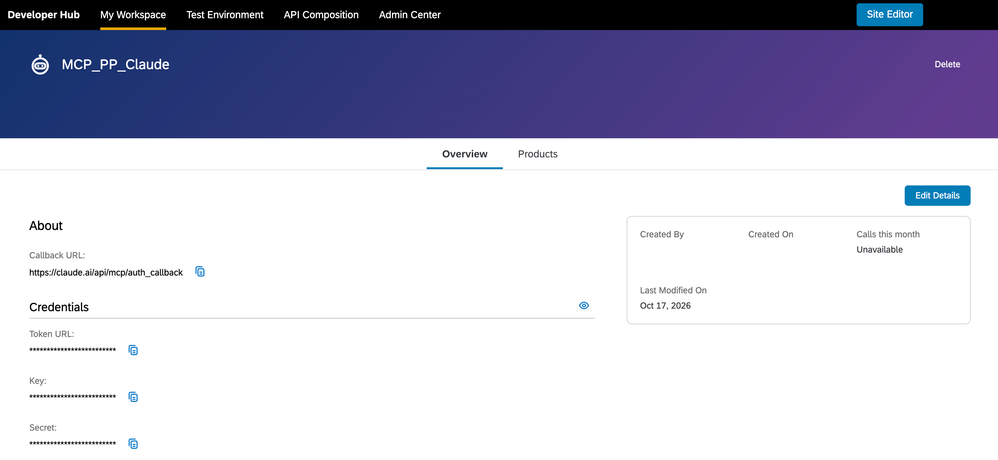
Developer Hub agent subscription
- Publish the MCP Server in a Developer Hub product.
- Create a Subscription for Agent for the specific MCP client.
- Choose Tenant XSUAA as the authentication provider.
- Enter that client's exact OAuth callback / redirect URI at subscription creation time.
- Configure the resulting OAuth Client ID and Secret in the MCP client; use the
authorization_codeflow, not a shared technical bearer token. - Confirm the user receives the scope required by the MCP authorization policy.
In this scenario the MCP policy expects API.invoke. This differs from my previous Northwind iFlow PoC, where a Process Integration Runtime technical token used ESBMessaging.send.
Lesson learned: in my trial environment, editing the callback URL on an existing Developer Hub subscription did not reliably update the underlying XSUAA OAuth client. Creating a new subscription with the correct callback from the beginning was the reliable fix.
5. Configure the BTP Destination for Principal Propagation
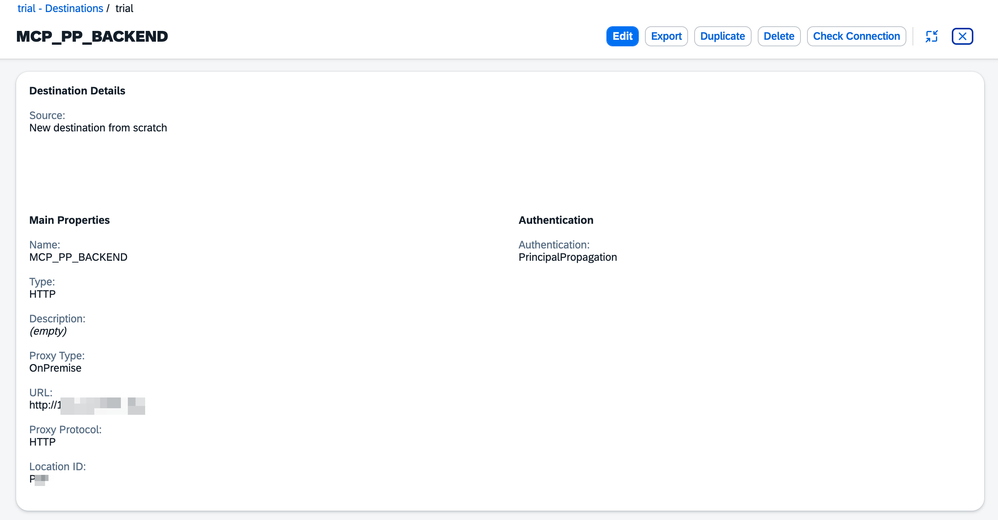
I created a BTP Destination for the backend behind Cloud Connector:
Name=MCP_PP_BACKEND
Type=HTTP
URL=http://<virtual-host>:8443
ProxyType=OnPremise
Authentication=PrincipalPropagation
ProxyProtocol=HTTP
CloudConnectorLocationId=PVE
The three properties that matter most are:
ProxyType=OnPremise: the request uses SAP Cloud Connector.Authentication=PrincipalPropagation: the request carries a user context that can be propagated downstream.CloudConnectorLocationId=PVE: the request uses the intended Cloud Connector connection.
The Destination uses http:// for the virtual host in this tested setup. This is not the same as the internal hop to the backend: the Cloud Connector mapping explicitly enables TLS to the Node.js server.
6. Configure SAP Cloud Connector
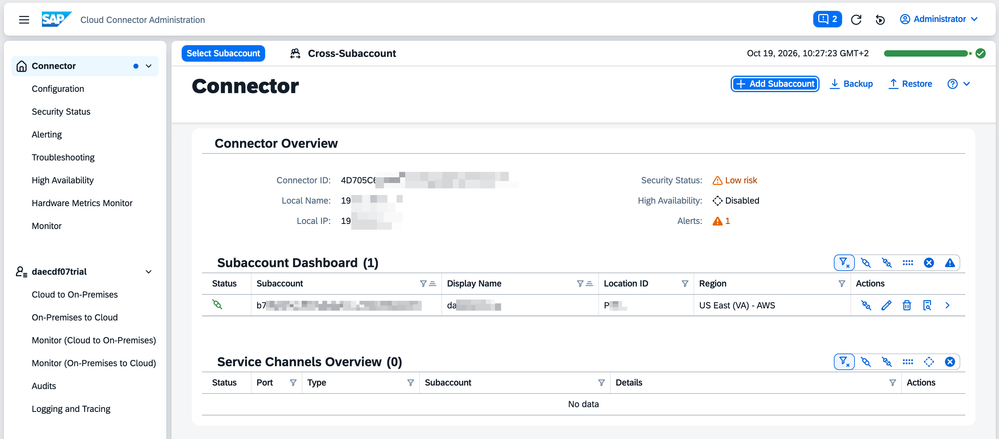
I installed SAP Cloud Connector 2.19.1 in a dedicated Debian container, registered it to the BTP subaccount and configured an access-control entry for the non-SAP backend.
6.1 Access control and TLS
Property Configuration
| Backend type | Non-SAP System |
|---|---|
| Internal host | pp-inspector.internal |
| Port | 8443 |
| Protocol in SCC UI | HTTP with Use TLS enabled |
| Principal type | X.509 Certificate |
| System Certificate for Logon | Enabled |
| Resource exposure | Only required backend API resources |
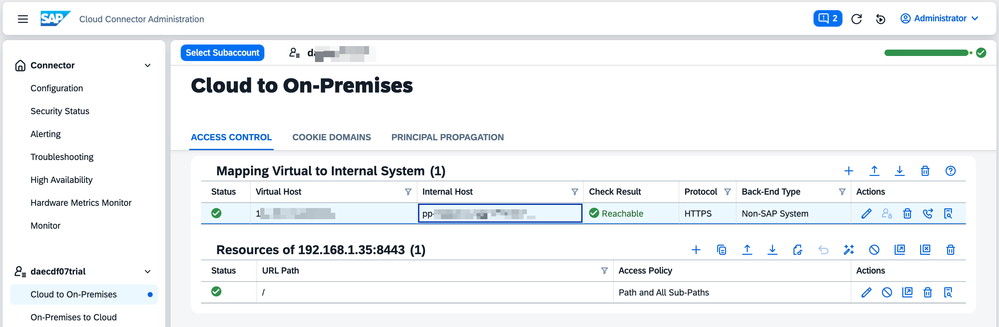
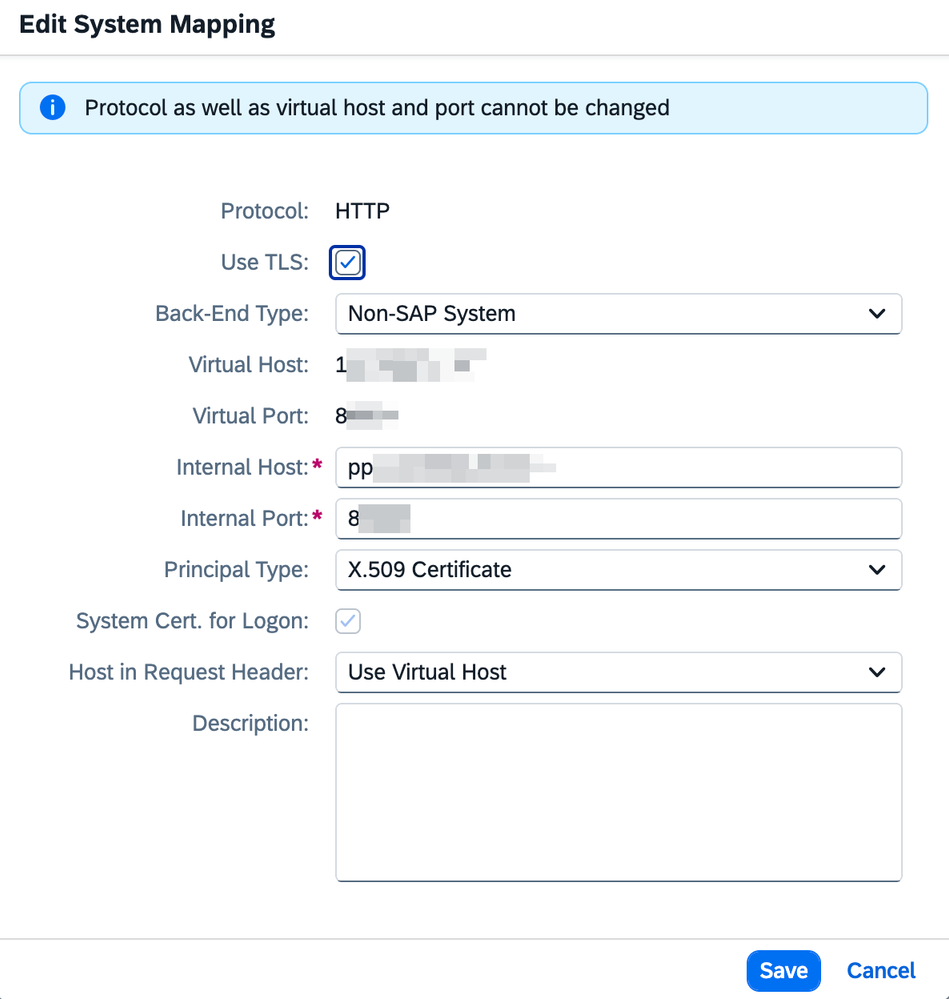
The backend HTTPS listener requires a trusted client certificate during the TLS handshake. A direct request without that certificate does not reach the REST application.
6.2 Two separate certificate roles
The Cloud Connector system certificate authenticates the machine to the backend over mTLS. Separately, Cloud Connector issues a short-lived end-user certificate for Principal Propagation.
I used a dedicated laboratory CA for user propagation and configured this certificate Subject Pattern:
CN=${email},OU=Propagated User,O=PP Inspector Lab,C=ESIn the tested XSUAA JWT context, ${email} resolved successfully. ${mail}, although seen in other Principal Propagation examples, was unavailable and caused certificate generation to fail.
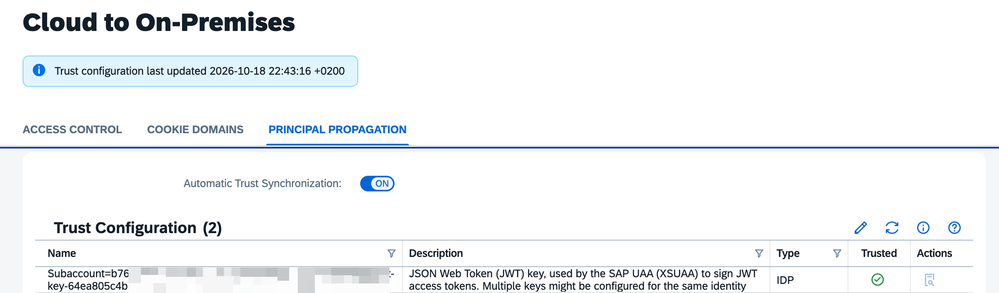
6.3 Synchronize XSUAA trust
In Cloud Connector → subaccount → Cloud to On-Premises → Principal Propagation, I synchronized the identity provider's signing/trust information.
Without it, Cloud Connector rejected the incoming user context:
SSO token validation failed.
Make sure trust is configured correctly
in the cloud connector.
Do not confuse this with BTP Cockpit → Security → Trust Configuration. The BTP subaccount's identity trust and Cloud Connector's token-signature trust are different configuration points.
7. Backend verification: trust the connection before the header
I intentionally avoided a design that accepts any request containing an SSL_CLIENT_CERT header. Instead, the backend starts with a mutually authenticated HTTPS channel.
- TLS layer: require and validate the Cloud Connector client certificate.
- System identity: check the exact trusted identity/pin of the TLS peer.
- User certificate: only after transport verification, decode the propagated certificate from the trusted path.
- PKI checks: validate certificate signatures, trusted issuer, validity, relevant CA constraints and configured purpose policy.
- Authorization: map the resulting principal to a backend role and evaluate business permissions.
That order is deliberate. A valid-looking user certificate injected over an untrusted connection is rejected as TRANSPORT_NOT_VERIFIED before the backend even parses the header.
When a reverse proxy is deployed in front of the application, it must remove any client-supplied identity headers and only forward identity information from an authenticated, trusted source. Simply enabling acceptance of underscored headers is not sufficient.
DEMO and REAL_PP: no confusing simulated tests with SAP evidence
Mode Trust source Maximum verdict
DEMO | Local test CA and simulated scenarios | SIMULATED |
|---|---|---|
REAL_PP | Actual Cloud Connector mTLS + propagated user certificate | VERIFIED when all checks pass |
The real mode refuses to start without the required TLS material, trusted issuer configuration, administrative protection and Cloud Connector identity pin. Local simulation cannot be mislabeled as a real SAP-verified request.
8. Troubleshooting: the problems that took the most time
These are issues encountered during the actual implementation, with the fixes that worked in this laboratory environment.
8.1 OAuth invalid_client despite valid credentials
MCP Inspector initially returned 401 invalid_client / Bad credentials, while the same OAuth client worked using curl. Isolated tests showed that the authorization-code grant was enabled; the Inspector was reusing stored OAuth credentials from a previous session. Clearing the persisted credentials and using the correct subscription resolved the mismatch.
A related observation from this XSUAA environment: HTTP Basic authentication using raw client_id:client_secret worked, while a percent-encoded Basic variant returned invalid_client. This is the behavior observed for the tested client, not a claim about all XSUAA deployments.
8.2 Backend TLS hostname mismatch
SSLHandshakeException: Invalid server certificate
Peer host '192.168.1.35' does not match certificate DNS names
[pp-inspector.internal, localhost]
The backend certificate contained an IP Subject Alternative Name, but this Cloud Connector configuration rejected the connection when targeting the IP. I changed the Internal Host to pp-inspector.internal and resolved that hostname from the Cloud Connector host. Using the DNS name fixed the handshake.
To investigate the failure I also added instrumentation around Node's TLS events (secureConnection and tlsClientError), because a TCP connection alone did not prove a successful handshake.
8.3 Missing Extended Key Usage in propagated certificates
reasonCode: CERT_MISSING_CLIENT_AUTH_EKUThe local test certificates had the TLS client authentication EKU. The propagated certificates from Cloud Connector in this setup had no EKU extension. Under RFC 5280, the absence of EKU does not itself prohibit use for a particular purpose.
Rather than silently weakening validation, I made the exception explicit and tied it to a dedicated CA:
USER_CERT_REQUIRE_CLIENT_AUTH_EKU=false
USER_CERT_CA_DEDICATED=true
The application refuses to start if the first setting is disabled without the second. This design relies on an explicitly dedicated certificate-issuing authority; it should not be copied unchanged into an environment with a shared corporate CA.
8.4 Distinguished Name ordering
Node.js: C=ES, O=PP Inspector Lab, OU=Principal Propagation,
         CN=PP Inspector Lab User CA
OpenSSL: CN=PP Inspector Lab User CA,OU=Principal Propagation,
         O=PP Inspector Lab,C=ES
Plain string comparison fails even though both representations describe the same DN components. The backend canonicalizes the components for the configured issuer comparison. In a production-grade PKI validator, DN parsing and name matching deserve a standards-compliant implementation rather than naive string operations.
8.5 SSL_CLIENT_CERT disappearing at nginx
nginx may discard incoming header names containing underscores. Without the relevant configuration, the application sees CERT_HEADER_MISSING and it looks like a propagation problem.
underscores_in_headers on;This line addresses parsing; it is not an authorization measure. Any intermediary handling propagated identity must also strip spoofable incoming identity headers and enforce the trusted TLS boundary.
8.6 Issuer allowlist containing commas
Issuer DNs naturally contain commas. My environment parser used a semicolon delimiter for the issuer allowlist. Treating commas as list separators split a valid DN into invalid fragments and rejected all user certificates.
8.7 Developer Hub callback updates
Updating a subscription callback in the Developer Hub UI did not reliably re-provision the redirect URI on the underlying XSUAA OAuth client. Creating a new client subscription with the correct callback proved more reliable than editing an existing one.
9. Real end-to-end results: the agent cannot see unauthorized data
Once the flow was running, a real MCP tool call reached the backend with a verified Cloud Connector transport and an independently validated user certificate.
HTTP status:                 200
Tool:                        get_my_orders
Principal Propagation:       VERIFIED
Transport mTLS:              VERIFIED
End-user X.509 certificate:  VERIFIED
Authenticated role:         SALES
Authorization decision:     0 of 4 orders visible
Certificate lifetime:       70 minutes (observed)
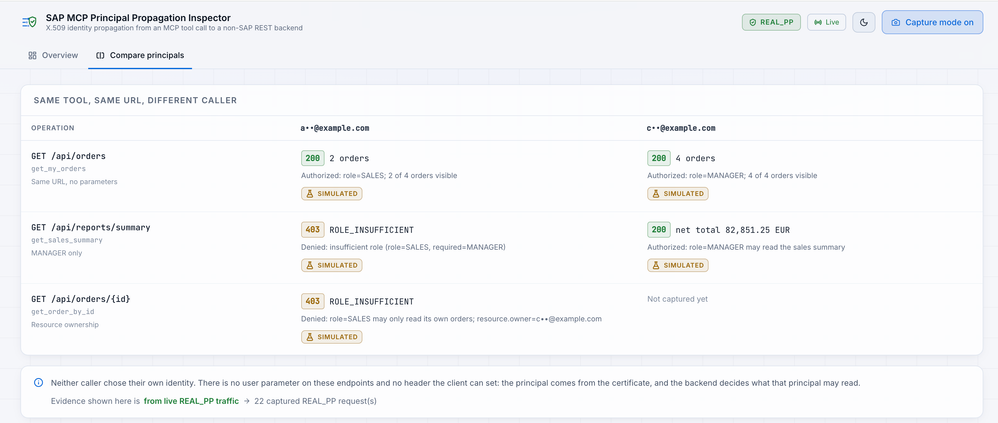
In a separate authorization comparison, I changed the backend role without changing the MCP tool, the client or the API URL:
Role evaluated by backend get_my_orders get_sales_summary
SALES | Only own authorized orders | 403 ROLE_INSUFFICIENT |
|---|---|---|
MANAGER | All orders allowed by manager policy | 200 OK |
Authorization happened in the backend, not inside the prompt. An agent cannot summarize or leak data that it never receives.

9.1 Live Demonstration: From an AI Agent Request to Backend Authorization
After getting the entire configuration working, I wanted to verify the most important part of the architecture: what actually happens when an AI agent invokes a business operation using a real user's identity?
The test follows the complete request lifecycle.
Step 1 — The AI agent invokes an MCP tool
I ask the agent to retrieve business orders. The MCP client invokes the corresponding tool exposed by SAP Integration Suite.
No user ID is passed as a tool parameter. The user's identity comes from the authenticated OAuth session.
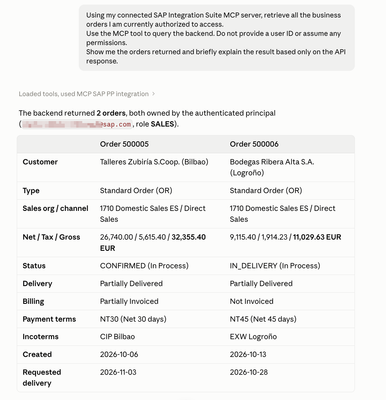
Step 2 — The backend verifies Principal Propagation
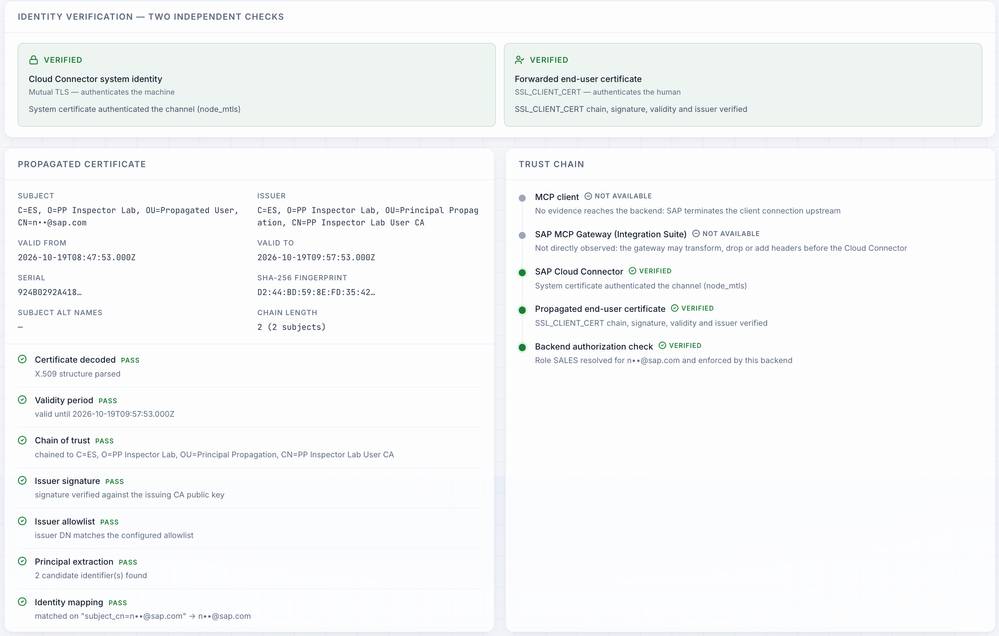
The request travels through SAP Integration Suite and SAP Cloud Connector, where the authenticated user context is propagated as an X.509 certificate.
The backend independently verifies the Cloud Connector's system identity through mTLS and validates the propagated end-user certificate.
The observability dashboard reports:
Principal Propagation: VERIFIED
Transport mTLS: VERIFIED
End-user certificate: VERIFIED
Backend authorization: ENFORCED
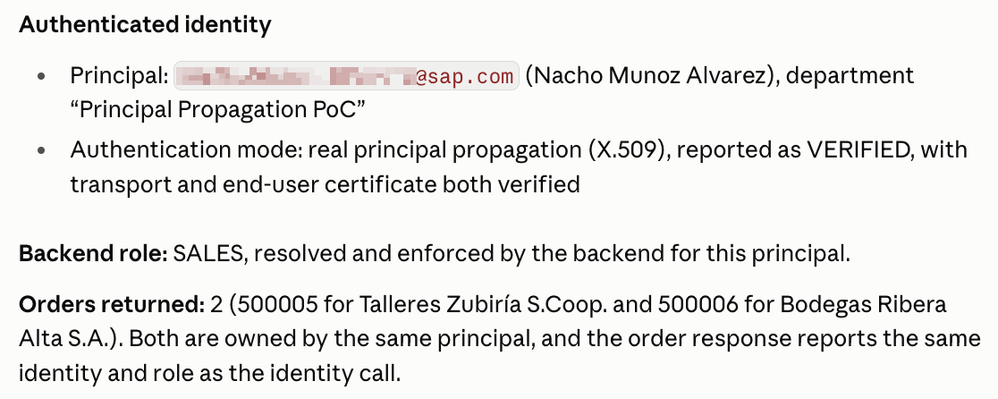
Step 3 — The backend decides what the agent is allowed to see
The most interesting part happens after authentication.
A successfully authenticated user is not necessarily authorized to access every business resource.
In the tested scenario, a SALES user receives 403 ROLE_INSUFFICIENT when requesting management reports, while a MANAGER is authorized to access them.
The MCP tools, API endpoint and client remain unchanged. The authorization decision belongs entirely to the backend.
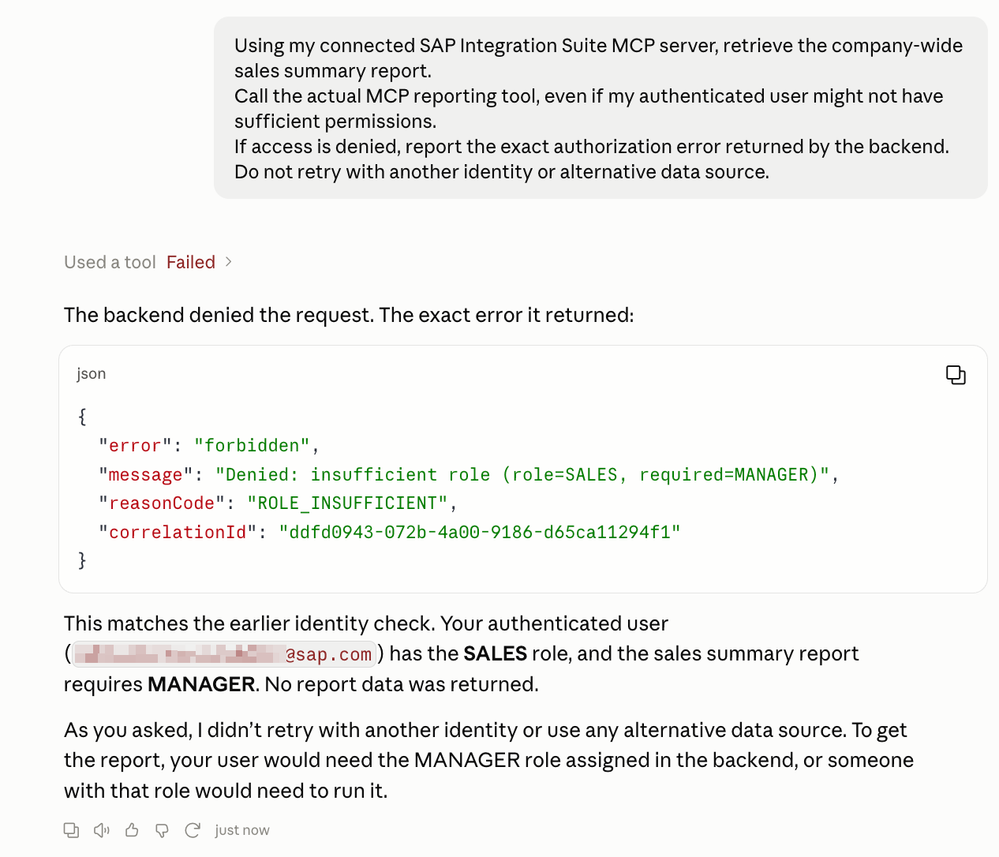
I then changed my backend role from SALES to MANAGER and repeated the exact same MCP request.
The authenticated user, OAuth session, MCP tool and SAP configuration remained unchanged. Only the role assignment in the backend was modified.
This time, the backend returned HTTP 200 with the company-wide sales report instead of HTTP 403 ROLE_INSUFFICIENT.
Same user. Same agent. Same MCP tool. Different backend permissions.
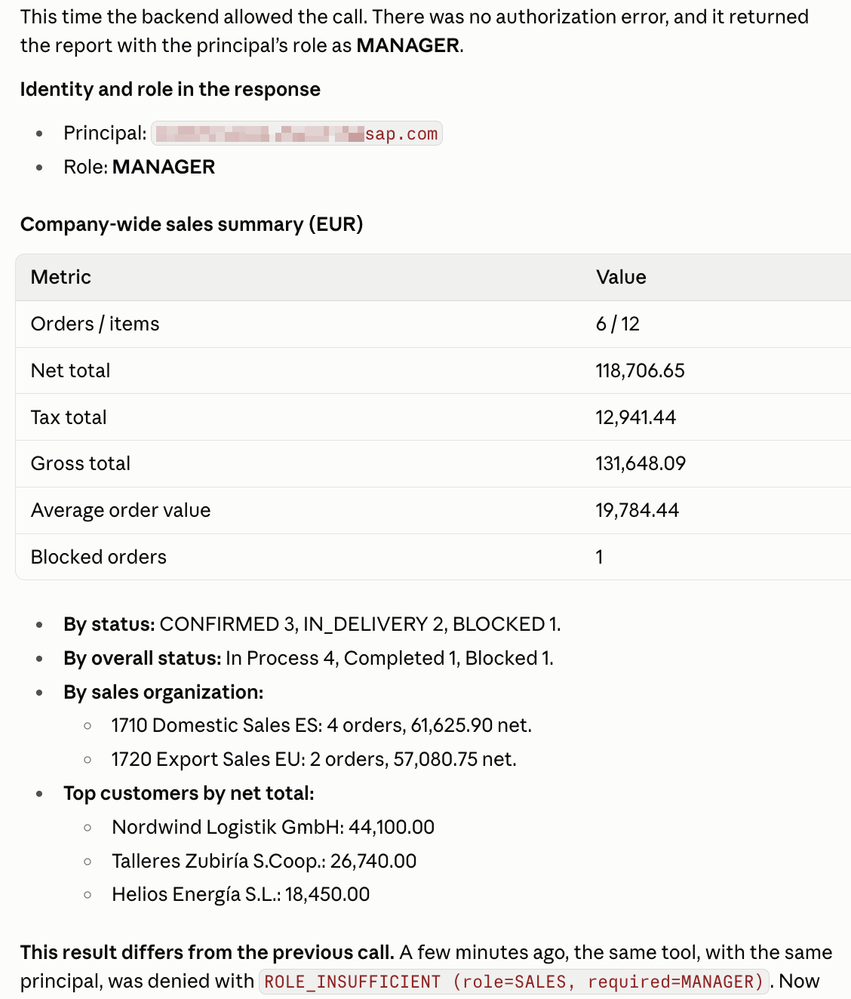

This is the key result of the PoC: the agent can request a business operation, but it cannot bypass the permissions of the authenticated human. Unauthorized data is rejected before it reaches the AI model.
What happened when the token expired?
I also tested an authenticated MCP session across a gap of more than eight hours. The client refreshed its OAuth token without another interactive sign-in, and the later tool invocation arrived with a different newly issued user certificate. Both invocations passed real propagation verification.
This demonstrates refresh within the tested session, not indefinite unattended access: eventually an expired or revoked refresh token may require the person to authenticate again.
10. Observability, tests and security review
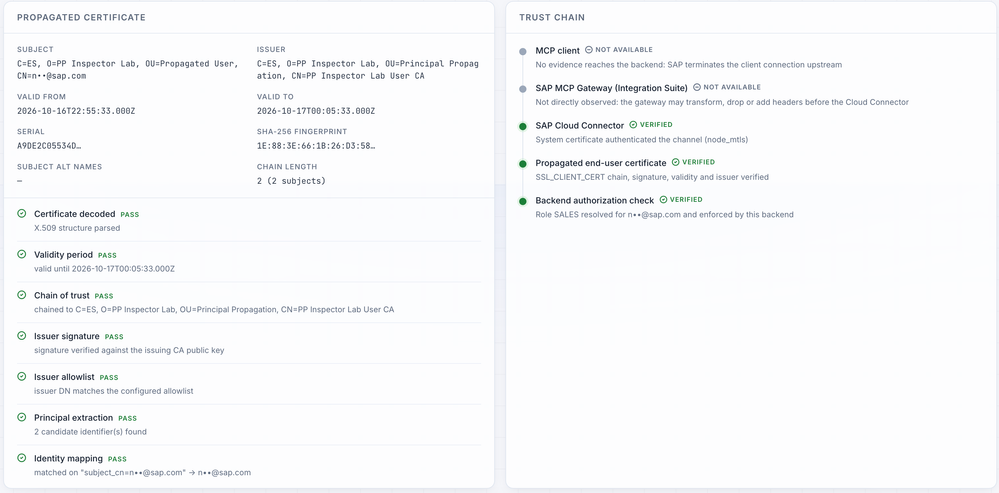
I built an observability dashboard that distinguishes facts the backend can actually prove from upstream stages it cannot directly observe:
MCP Client                 NOT AVAILABLE (backend view)
SAP MCP Gateway            NOT AVAILABLE (backend view)
SAP Cloud Connector        VERIFIED
Propagated user cert       VERIFIED
Backend authorization      VERIFIED
This is deliberate. The backend cannot independently verify an upstream MCP exchange that was terminated by SAP Integration Suite, so the dashboard does not invent evidence for those earlier steps.
The PoC includes:
- 108 automated tests using Vitest, with passing lint, typecheck and build.
- 17/17 smoke tests against the deployed stack.
- Two validated OpenAPI 3.0.3 specifications.
- Contract tests checking that documented OpenAPI routes match the actual Fastify route tree in both modes.
- Independent adversarial security review using OpenAI Codex; reported findings led to additional tests and fixes for transport trust, certificate identity matching, response disclosure and administration protection.
11. What this PoC does — and does not — prove
Demonstrated: real end-user identity propagated through an SAP Integration Suite MCP Server and SAP Cloud Connector into a non-SAP REST backend, followed by cryptographic certificate checks and backend-enforced role authorization. Token refresh was observed across a prolonged authenticated session.
Not demonstrated: deployment against S/4HANA/ABAP, production hardening, load testing at scale, or write operations. The environment used SAP BTP Trial and a Proxmox homelab, and the business dataset was fictional.
The backend certificate-chain checker also does not claim to be a complete RFC 5280 implementation. It does not enforce every path-length, name-constraint, certificate-policy or algorithm-policy rule, and it does not perform CRL/OCSP revocation checking. Those are real limits and must be addressed before adopting this pattern as a production security component.
12. Final thoughts
My first MCP PoC answered:
Can AI agents discover and invoke enterprise APIs through SAP Integration Suite?
This second experiment answers a harder question:
Can the backend enforce the permissions of the actual human behind the agent?
In this tested environment, yes. XSUAA authenticated the user, SAP Integration Suite exposed the MCP tools, Cloud Connector propagated the identity, and the backend independently checked the trust boundary before deciding which business data to return.
The most important result was not the successful 200 OK. It was the data that never reached the AI agent.
Related reading: From SAP Integration Suite iFlow to MCP Tools: Exposing OData APIs to AI Agents (my earlier PoC).
Technologies: SAP Integration Suite, SAP BTP, SAP Cloud Connector, MCP, XSUAA, OAuth 2.0, X.509, Node.js, Fastify, TypeScript, Proxmox.