Publicado originalmente en SAP Community
What is MCP and why does it matter for SAP?
Model Context Protocol (MCP) is an open standard that lets AI agents discover and invoke tools at runtime. Instead of hardcoding API calls into your agent, you publish an MCP Server — a runtime endpoint that advertises a list of named, described tools. The agent reads those descriptions and decides autonomously which tool to call and with which parameters.
SAP Integration Suite now acts as an enterprise MCP Gateway: it hosts MCP Servers on the Integration Cell runtime, enforces OAuth2 authentication, rate limiting and audit logging, and lets you govern exactly which agents can call which tools.
In this post I'll show you how to go from zero to a working MCP Server in SAP Integration Suite (BTP Trial) — using the Northwind OData V4 API as the backend. Northwind uses the same OData V4 protocol as SAP S/4HANA and SuccessFactors, so everything here maps directly to real SAP backends.
The full end-to-end stack looks like this:
AI Agent (Claude Code)
   ↓  OAuth2 client_credentials  (scope: ESBMessaging.send)
MCP Server  —  Integration Cell runtime
   ↓  forwards Bearer token
Cloud Integration iFlow  (Northwind_API)
   ↓  CamelHttpPath + CamelHttpQuery passthrough
Northwind OData V4   https://services.odata.org/V4/Northwind/Northwind.svc/
Prerequisites
- SAP BTP trial account
- SAP Integration Suite activated (trial plan) with Cloud Integration + API Management capabilities
- Integration Cell runtime enabled and Active (Settings → Runtimes)
- SAP Process Integration Runtime service instance — plan
integration-flow— with a Service Key
Step 1 — Enable the Integration Cell runtime
Go to SAP Integration Suite → Settings → Runtime Profiles and activate both Cloud Integration and Integration Cell.
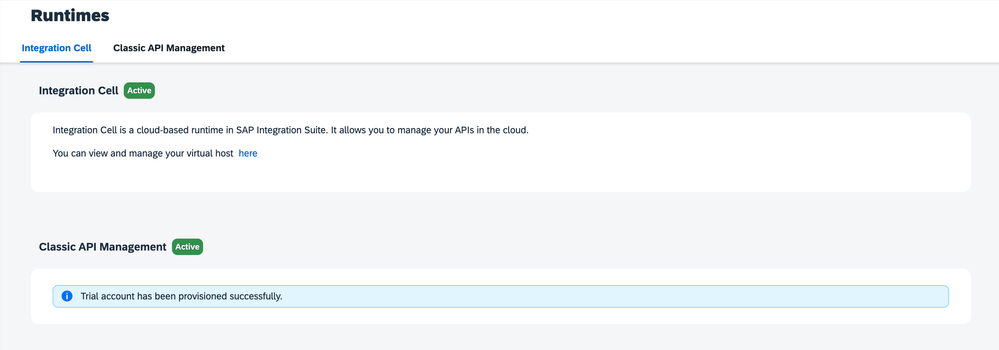
Then go to Settings → Runtimes and confirm both show status Active. The MCP Server artifact requires the Integration Cell runtime — it cannot be deployed to Cloud Integration.
Step 2 — Create an Integration Package
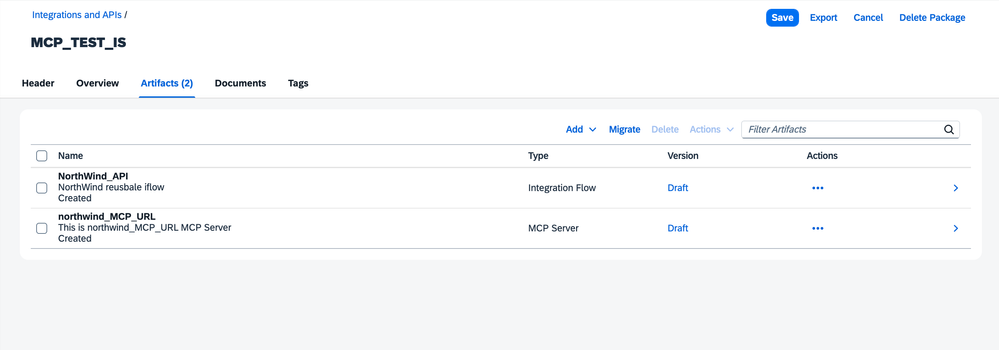
Go to Design → Integrations and APIs → Create and create a new package. I named mine MCP_TEST_IS. All artifacts for this PoC live here: the iFlow and the MCP Server.
Step 3 — Build the iFlow
Inside the package, create a new Integration Flow called Northwind_API. The flow is deliberately simple: a single HTTPS Sender → HTTP Receiver with no transformation steps.
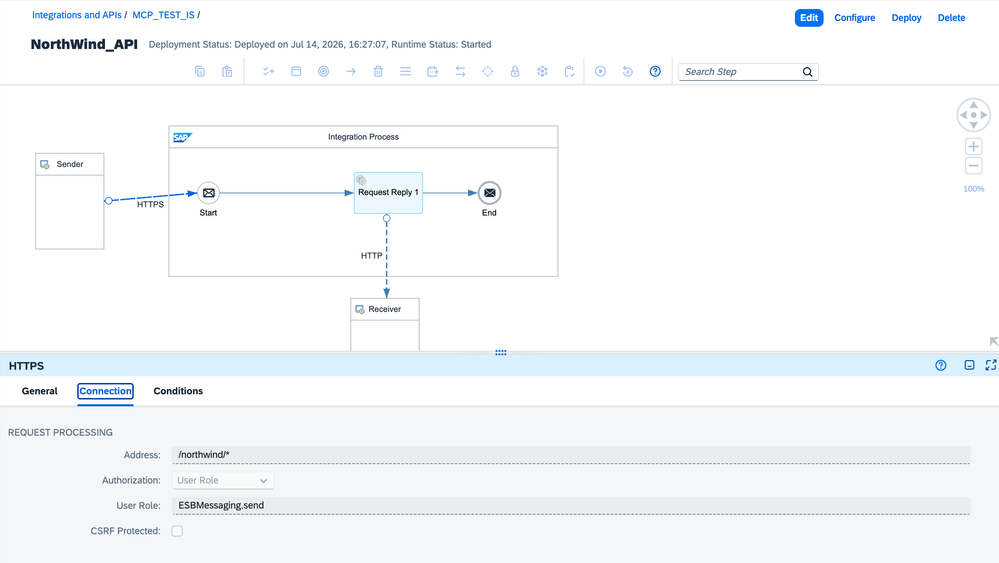
HTTPS Sender
Field Value
| Address | /northwind/* |
|---|---|
| CSRF Protected | No |
| Authorization | User Role: ESBMessaging.send |
The wildcard address /northwind/* means a single iFlow handles all three entity paths (/northwind/Employees, /northwind/Customers, /northwind/Orders). SAP CPI automatically captures the dynamic segment in the Camel header CamelHttpPath, and the full OData query string in CamelHttpQuery.
HTTP Receiver
Field Value
| Address | https://services.odata.org/V4/Northwind/Northwind.svc/${header.CamelHttpPath}?${header.CamelHttpQuery} |
|---|---|
| Query | (leave empty) |
| Method | GET |
| Authentication | None |
Important: Put the full URL including the query string directly in the Address field. Do not use the separate Query field — it escapes $ signs and breaks all OData parameters.
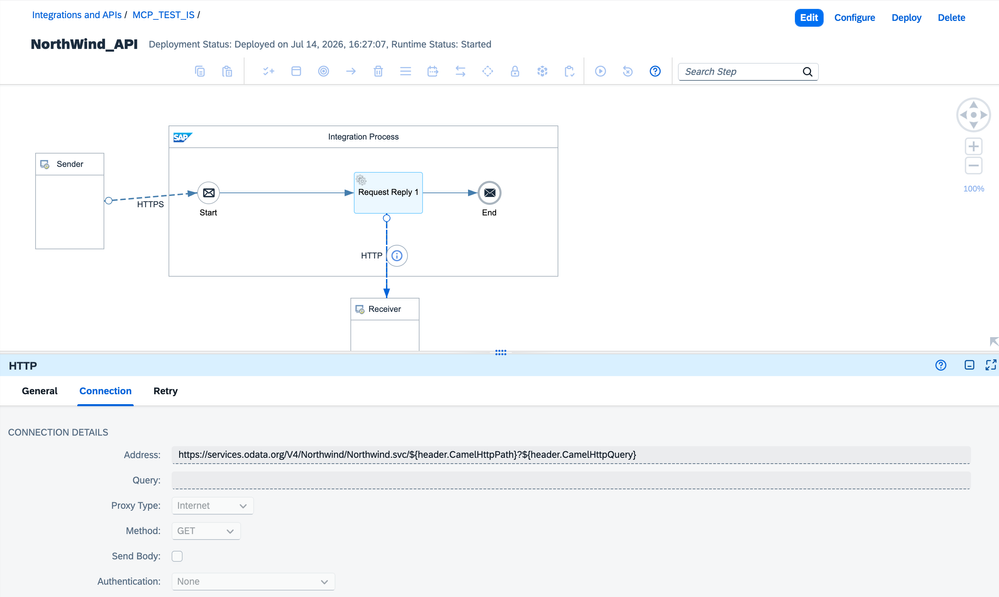
No Content Modifier. No Groovy script. The two Camel headers are populated automatically by the runtime.
Deploy the iFlow to the Cloud Integration runtime and wait for status Started.
Step 4 — Create the OpenAPI spec
The MCP Server needs an OpenAPI 3.0.1 spec. Each operationId becomes a tool name that the AI agent can discover and call. The description fields are what the agent reads to understand when and how to use each tool — write them for the agent, not for a human developer.
Two fields in the spec are specific to SAP Integration Suite:
info.x-targetEndpoint— the Cloud Integration runtime URL the MCP Server will forward calls toservers[0].url— the Integration Cell base URL (used by clients to reach the MCP Server itself)
{
  "openapi": "3.0.1",
  "info": {
    "title": "NorthWind API",
    "version": "1.0.0",
    "x-targetEndpoint": "https://<your-tenant>.it-cpitrial05-rt.cfapps.us10-001.hana.ondemand.com/http"
  },
  "servers": [{ "url": "https://<your-tenant>.a.integration.cloud.sap/northwind" }],
  "paths": {
    "/northwind/Employees": {
      "get": {
        "operationId": "getEmployees",
        "summary": "Get Employees",
        "description": "Returns employees. Supports OData: $filter (e.g. City eq 'London'), $top, $select, $orderby",
        "parameters": [
          { "name": "$filter", "in": "query", "schema": { "type": "string" } },
          { "name": "$top",    "in": "query", "schema": { "type": "integer" } },
          { "name": "$select", "in": "query", "schema": { "type": "string" } },
          { "name": "$orderby","in": "query", "schema": { "type": "string" } }
        ],
        "responses": { "200": { "description": "List of employees" } }
      }
    },
    "/northwind/Customers": { "...": "same pattern with getCustomers" },
    "/northwind/Orders":    { "...": "same pattern with getOrders + $expand" }
  }
}
Step 5 — Create the MCP Server artifact
Inside the same package, add a new artifact of type MCP Server.
Field Value
| Name | northwind_MCP |
|---|---|
| MCP Path | /northwind-mcp |
| Source Type | HTTP Endpoint + OpenAPI Spec |
| URL | https://<your-tenant>.it-cpitrial05-rt.cfapps.us10-001.hana.ondemand.com/http |
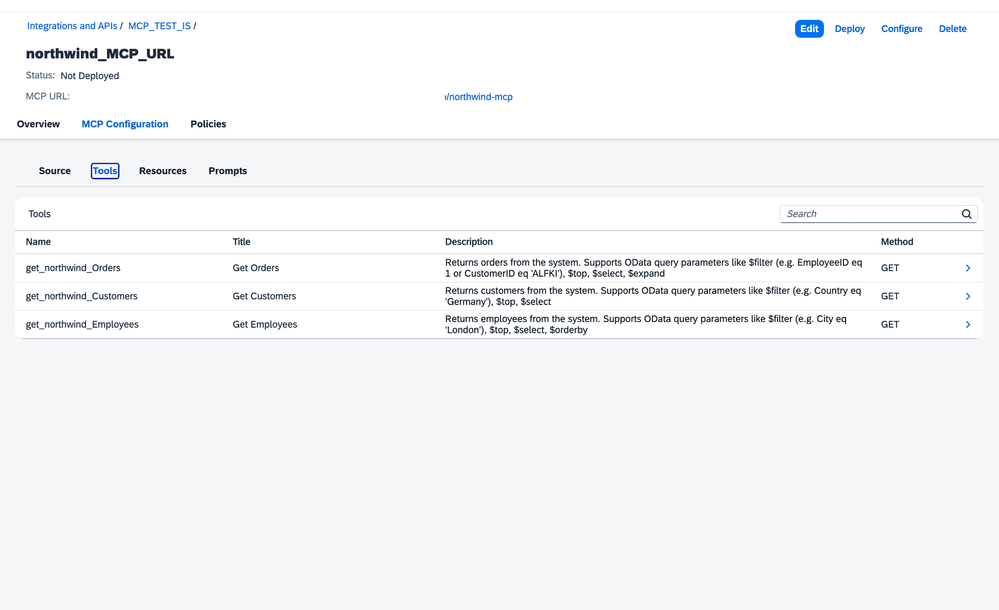
Upload the OpenAPI spec in the spec editor. The MCP Server parses it and shows 3 tools:
Tool name Description
getEmployees | Get Employees — OData filter, top, select, orderby |
|---|---|
getCustomers | Get Customers — OData filter, top, select |
getOrders | Get Orders — OData filter, top, select, expand |
Step 6 — Configure Policies (critical)
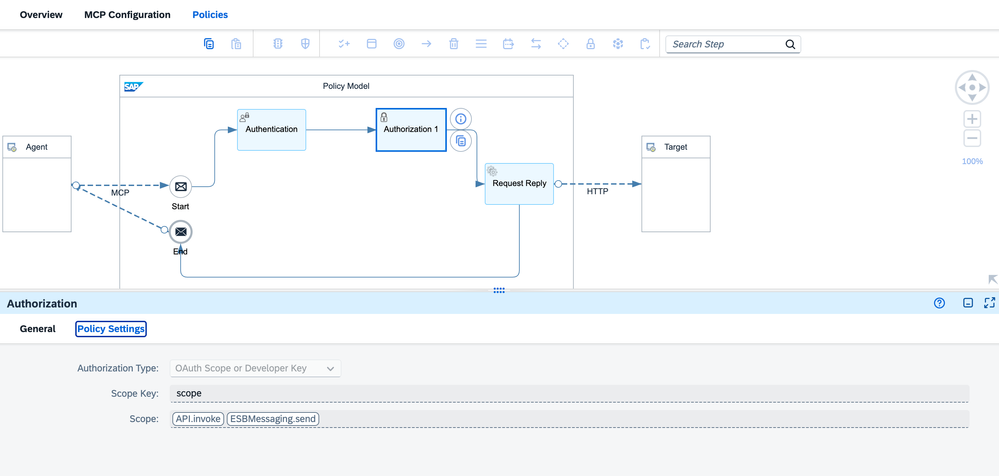
Under the MCP Server policies, configure:
- Authentication: OAuth2, pointing to your XSUAA token URL
- Authorization: change the scope from
API.invoketoESBMessaging.send
⚠️This is the most common mistake. The default Authorization policy scope is API.invoke. But the SAP Process Integration Runtime service key (plan integration-flow) generates tokens with scope ESBMessaging.send. If you leave the default, every call returns 403 Forbidden.
Step 7 — Deploy
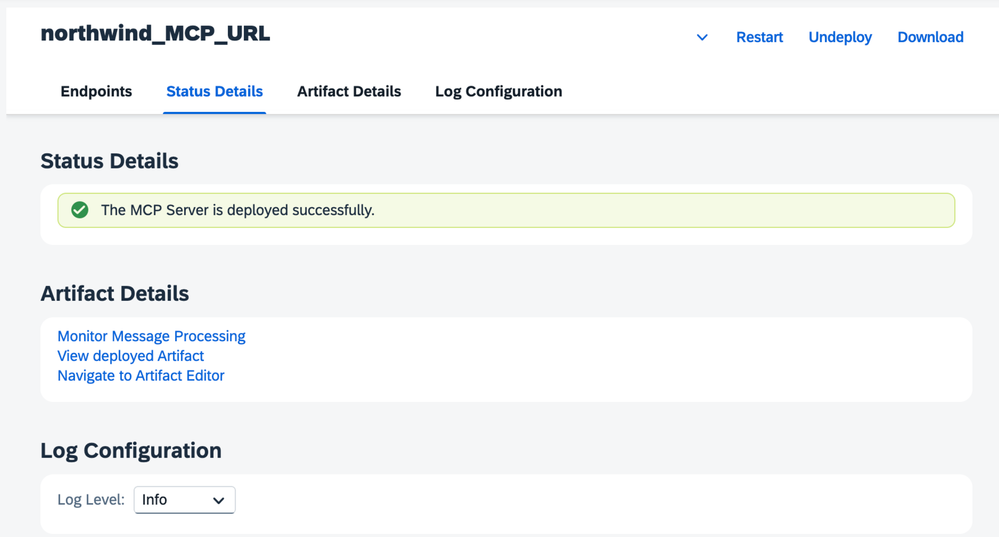
Deploy the MCP Server to the Integration Cell runtime. Wait for status Started.
Step 8 — Test with curl
Get a Bearer token:
TOKEN=$(curl -s -X POST \
  "https://<your-tenant>.authentication.us10.hana.ondemand.com/oauth/token" \
  -H "Content-Type: application/x-www-form-urlencoded" \
  -d "grant_type=client_credentials&client_id=<CLIENT_ID>&client_secret=<CLIENT_SECRET>" \
  | python3 -c "import sys,json; print(json.load(sys.stdin)['access_token'])")
List available tools:
curl -s -X POST "https://<your-tenant>.a.integration.cloud.sap/northwind-mcp" \
  -H "Authorization: Bearer $TOKEN" \
  -H "Content-Type: application/json" \
  -d '{"jsonrpc":"2.0","id":1,"method":"tools/list","params":{}}'
Call a tool:
curl -s -X POST "https://<your-tenant>.a.integration.cloud.sap/northwind-mcp" \
  -H "Authorization: Bearer $TOKEN" \
  -H "Content-Type: application/json" \
  -d '{
    "jsonrpc":"2.0","id":2,"method":"tools/call",
    "params":{
      "name":"getEmployees",
      "arguments":{"$filter":"City eq '\''Seattle'\''"}
    }
  }'
Results: Nancy Davolio, Laura Callahan. ✅
Step 9 — Connect Claude Code as an AI agent
Register the MCP Server in Claude Code:
claude mcp add northwind \
  --transport http \
  --url "https://<your-tenant>.a.integration.cloud.sap/northwind-mcp" \
  --header "Authorization: Bearer <TOKEN>"
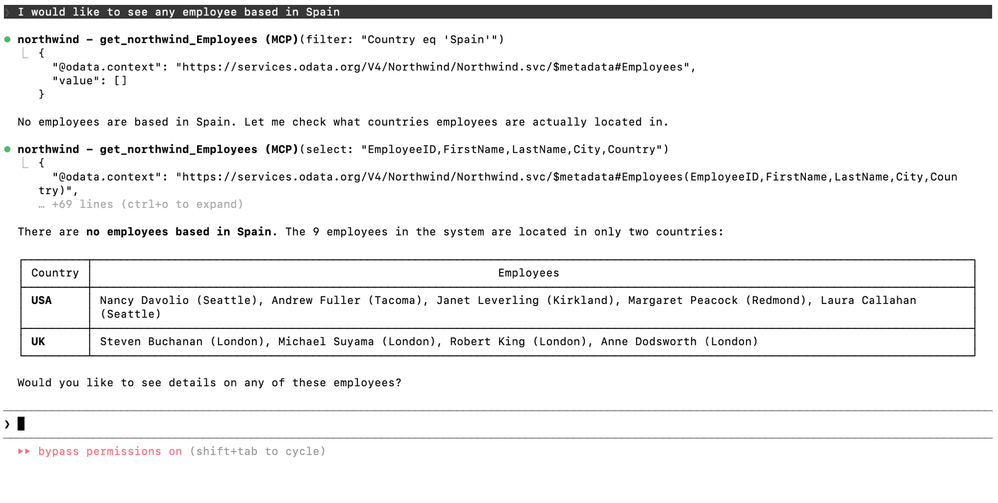
Now ask in natural language. A few examples from the live demo:
"Show me employees in Spain"
Claude calls getEmployees with $filter=Country eq 'Spain' → empty result. It then self-corrects, calls again with $select=EmployeeID,FirstName,LastName,City,Country to list all employees, and responds: "There are no employees in Spain. The 9 employees are in USA and UK."
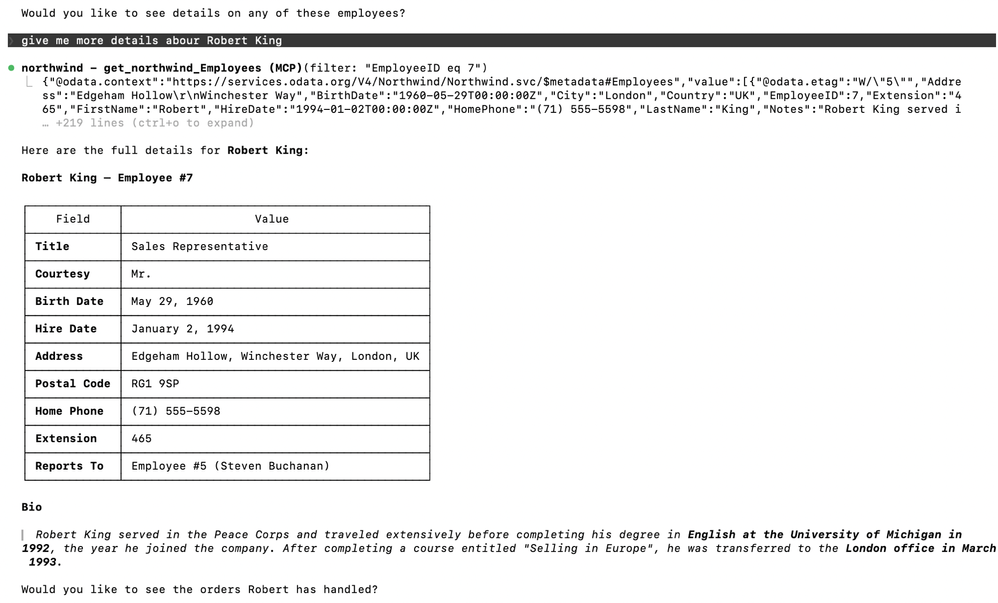
"Give me more details about Robert King"
Claude calls getEmployees with $filter=EmployeeID eq 7 and presents his full profile: Sales Representative, London, hired January 1994, reports to Steven Buchanan.
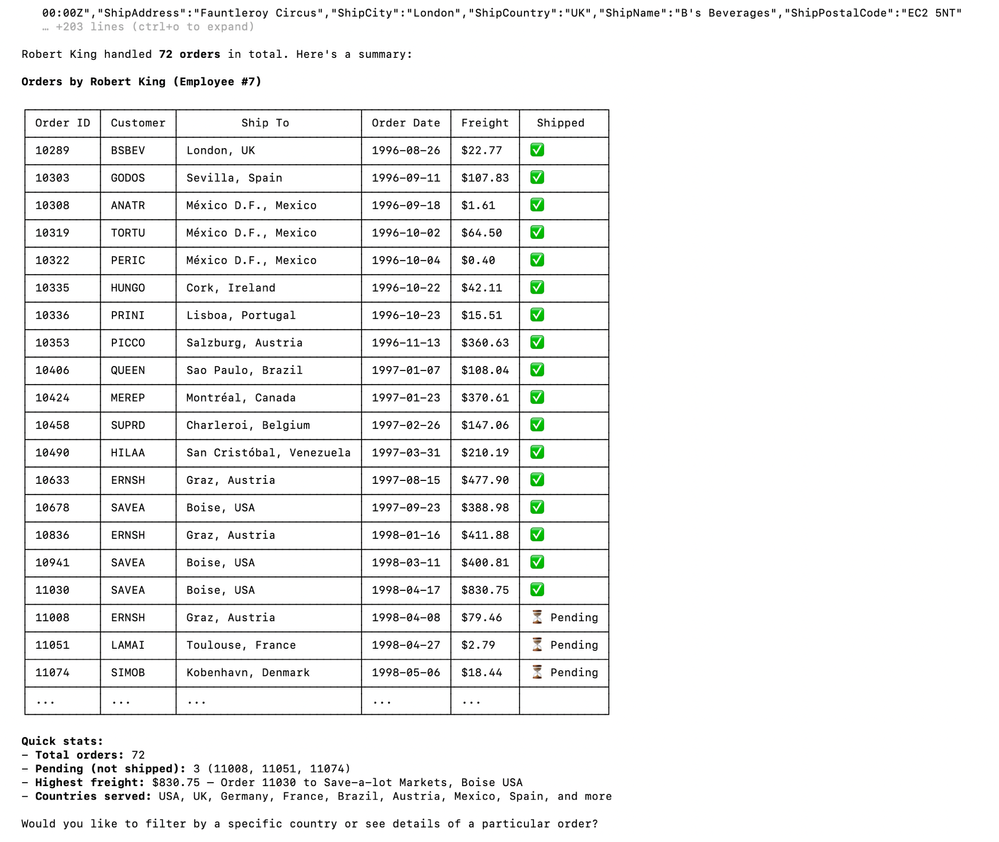
"Show me the orders Robert has handled"
Claude calls getOrders with the employee filter and summarises: 72 orders total, 3 pending, highest freight $830.75, countries served across USA, UK, Germany, France, Brazil, Austria, Mexico, Spain and more.
The agent chains tool calls autonomously. When Spain returned no results it self-corrected without being asked. This is the power of intent-shaped tools with rich descriptions: the AI decides how to query, not just what to call.
Key learnings
1. Scope: ESBMessaging.send — not API.invoke
The SAP Process Integration Runtime service key (plan integration-flow) generates tokens with scope ESBMessaging.send. The default Authorization policy uses API.invoke. Always change it or you'll get 403 on every call.
2. CamelHttpPath + CamelHttpQuery — no Groovy needed
A wildcard Sender address (/northwind/*) plus ${header.CamelHttpPath} and ${header.CamelHttpQuery} in the Receiver Address is enough to route all entities dynamically through a single iFlow. No Content Modifier, no Groovy script.
3. Query string goes in the Address field
The Receiver's separate Query field escapes $ signs and breaks OData parameters. Put the full URL including ?${header.CamelHttpQuery} in the Address field.
4. Intent-shaped tools beat endpoint-shaped tools
Name tools after business operations, not HTTP endpoints. Write descriptions for the AI agent — tell it when to use the tool and what parameters make sense. The agent uses those descriptions to decide autonomously what to call and how.
5. x-targetEndpoint is the routing key
The info.x-targetEndpoint field in the OpenAPI spec is what the MCP Server uses at runtime to forward calls to the iFlow. It must point to the Cloud Integration runtime URL, not the Integration Cell URL.
What's next
In the next post I'll cover Approach B — API Proxy: same result but the MCP Server sits in front of an API Artifact (deployed to Integration Cell) instead of an iFlow. That adds a full governance layer — rate limiting, IP blocking, payload protection — without changing a line of iFlow logic. The key new concept there is Trust Upstream MCP Authorization, which lets the API Artifact accept calls forwarded by the MCP Server without re-validating the token.